On-Chain Tasks
Build an onchain task field by field in the Create Task dialog.
Walk through building a task in the real Zyper interface, with mock data and nothing connected to a chain. The tour highlights each field in turn and explains what it does.
This page maps the on-chain Create Task dialog to what the app stores and executes.
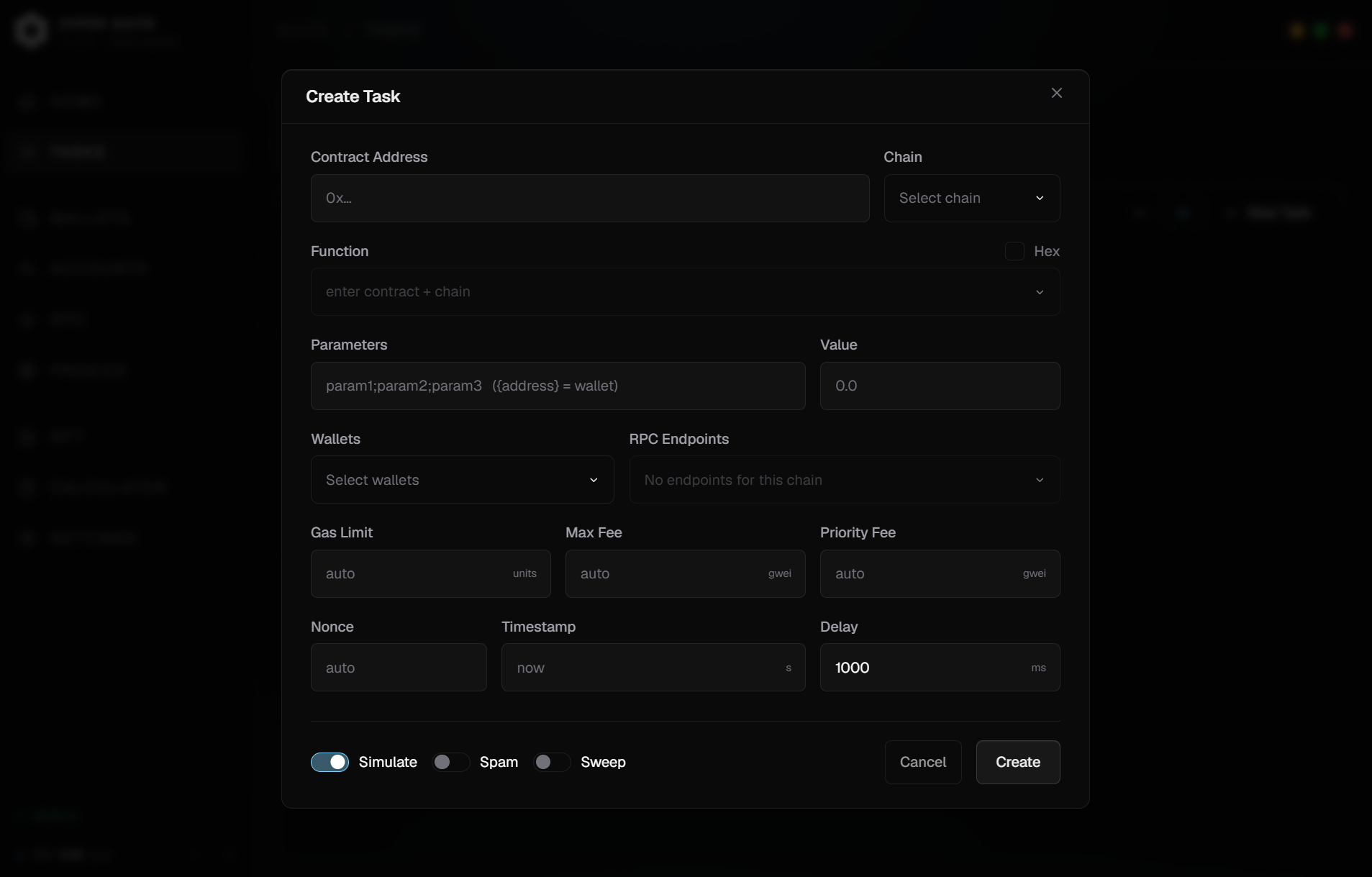
Contract Address#
| Target | What happens |
|---|---|
| Contract Address | ABI Function or raw hex calldata |
| OpenSea Drop URL | The app resolves the drop, phase, price, and SeaDrop calldata |
| Transient Mint URL | The app resolves the mint details and prefills the task |
For a normal contract address, Zyper attempts ABI lookup and then renders a function picker. If the ABI cannot be found, you can paste an ABI manually or switch to raw hex calldata. For launchpad links, Zyper will resolves and fill the necessary fields. You will choose which phase and how many NFTs to mint, then set up the wallets, RPC, and gas settings.
More launchpad supports coming soon
Function or Hex Mode#
ABI mode lists state-changing functions only. Pick the function and fill each argument. Hex mode skips ABI encoding and sends the raw calldata you provide. This is useful when a site or extension capture already gave you the final data field.
Function mode is better used when you want to fill out the parameters differently. Hex is better used for a tx that has same exact content.
Fields & Value#
In ABI mode, Fields fills the selected function’s inputs in order. Separate
top-level inputs with semicolons—for example 2;0xabc…;[1,2,3]. The number of
entries must match the function ABI. Fields is disabled for a function with no
inputs and in Hex mode, where the raw calldata is already encoded.
Field templates#
| Token | Meaning |
|---|---|
{address} | The spawned task wallet’s full 0x… address. This is the normal choice for an ABI address field. |
{wallet} / {self} | The signing wallet as lowercase 40-character hex without 0x. Works in ABI fields and inside raw calldata; it can also be used as the Contract Address for a self-send. |
{id} / {idN} / {idA-B} | Owner-scan scavenger search for an available token ID. {id777} searches IDs from 0 through 777; {id100-777} limits it to that explicit range. |
{n} / {nN} / {nA-B} | Generic simulation scavenger search. {n777} searches numbers from 1 through 777. |
Scavenger templates are case-insensitive. Adding an {id…} or {n…} token
locks the task to Simulate and disables Spam: Zyper searches for a value
whose call succeeds, broadcasts it, and looks for another candidate if that
value is lost to another minter first.
Value#
Value is the total decimal amount of the selected chain’s native asset sent
with each transaction—not a per-item price. Use 0 or leave it empty for a
free/non-payable call. For a generic paid mint, enter the mint price multiplied
by the quantity. Supported launchpad resolvers normally calculate and prefill
the total for you. In ABI mode, Value is disabled when the selected function is
not payable.
Wallets and RPC#
Choose a wallet group and the wallet used for the tasks. One task = one wallet. RPC pick is optional, by default all RPC for that chain is selected. You can select single or multiple RPC. The RPC distribution depends on Multi-RPC Broadcast in your settings.
If Multi-RPC broadcast is on, Zyper sends to every URL in the task’s RPC list in parallel. Same exact payload and gas settings, no nonce-clash risk. First RPC to accept it wins. If Multi-RPC broadcast is off, Zyper assigns each task with 1 RPC, round-robin style.
Gas Settings#
If left on auto, Zyper will pick the recommended gas by the RPC endpoint at the moment of transaction firing.
- Gas Limit — most of the time you want to leave this on auto. Filling the gas limit reducing one RPC call needed before firing the transaction, but wrongly configured amount can risk running out of gas before transaction filled.
- Max Fee and Priority Fee — max fee is the max gwei amount you’re willing to spend on the transaction. While the priority fee is the tip you’re willing to give for your transactions to be included. The priority fee will always be spent. Max fee must always bigger or equal the priority fee.
Timing Settings#
- Nonce — most of the time you’d want to leave this on auto. use this to target specific nonce of the wallet
- Timestamp — unix format, the tasks will wait until the timestamp hit and then start firing.
- Delay — the time spent to wait until next retry
Modes#
- Simulate — repeatedly simulate the transaction until it doesn’t reverts, then broadcasts the real transaction.
- Spam — repeatedly signs and broadcasts attempts until success, or task stop, or a max attempt count / an end timestamp / the spam guardrail reached.
- Simulate OFF (Instant) — signs and send transactions instantly, regardless of reverts.
See Modes for the full behavior and combinations.
Flashbots#
Flashbots is mainnet-only and requires Settings > Flashbots to be configured.
Outside Spam, enabling Flashbots submits the same signed transaction as a bundle while the public mempool broadcast also happens. Turning on Flashbots Only skips the public mempool and waits for the bundle path.
In Spam mode, Flashbots changes Spam into a bundle-only spam path on mainnet. Missed bundles cost no gas and do not consume nonce.
Building One, Start to Finish#
Build and start an on-chain task
7 steps- 1Set the target
Step 1
Paste a contract address, an OpenSea drop URL, or a Transient mint URL. Zyper resolves what it can and prefills the rest.
- 2Pick the function, or switch to hex
Step 2
ABI mode lists state-changing functions and renders an argument form. Hex mode sends raw calldata you already have — better when the transaction content is always identical.
- 3Fill fields and value
Step 3
Enter one ABI argument per semicolon-separated field. Value is the total native-asset amount for the transaction; supported launchpads normally prefill it.
- 4Choose wallets and RPC
Step 4
One task = one wallet. RPC selection is optional — by default every RPC for that chain is selected.
- 5Set gas and timing
Step 5
Leave gas on auto unless you have a reason not to. Use Timestamp to hold the task until the drop opens.
- 6Pick a mode
Step 6
Instant sends regardless of reverts. Simulate waits until the call stops reverting. Spam retries until something lands.
- 7Save, then start
Step 7
Tasks are created Idle. Start the group or individual rows and watch the status pills.
Sweep#
For non-spam on-chain mints, you can enable sweep to transfer the NFT and ETH to another wallet instantly. This is usually used for wallets that are bought from WL market to protect your NFT and ETH.
Sweep is disabled in Spam because repeated attempts and post-success transfer sequencing do not compose cleanly.